TraceCraft
Vendor-neutral LLM observability — instrument once, observe anywhere.
TraceCraft is a Python observability SDK with a built-in Terminal UI (TUI) that lets you visually explore, debug, and analyze your agent traces right in your terminal — no browser, no cloud dashboard, no waiting.
The fastest path: zero code changes
If your app already uses OpenAI, Anthropic, LangChain, LlamaIndex, or any OpenTelemetry-compatible framework, TraceCraft can observe it without touching a single line of application code.
Step 1 — Install and set one environment variable:
pip install "tracecraft[receiver,tui]"

export OTEL_EXPORTER_OTLP_ENDPOINT=http://localhost:4318
Step 2 — Start the receiver and TUI together:
tracecraft serve --tuiStep 3 — Run your existing app unchanged:
python your_app.pyTraces from any OTLP-compatible framework (OpenLLMetry, LangChain, LlamaIndex, DSPy, or any standard OpenTelemetry SDK) stream live into the TUI the moment they arrive. No init() call. No decorators. No code changes.
The Terminal UI — Your Agent’s Black Box Recorder
After traces are flowing in, the TUI gives you complete visibility into every agent run:
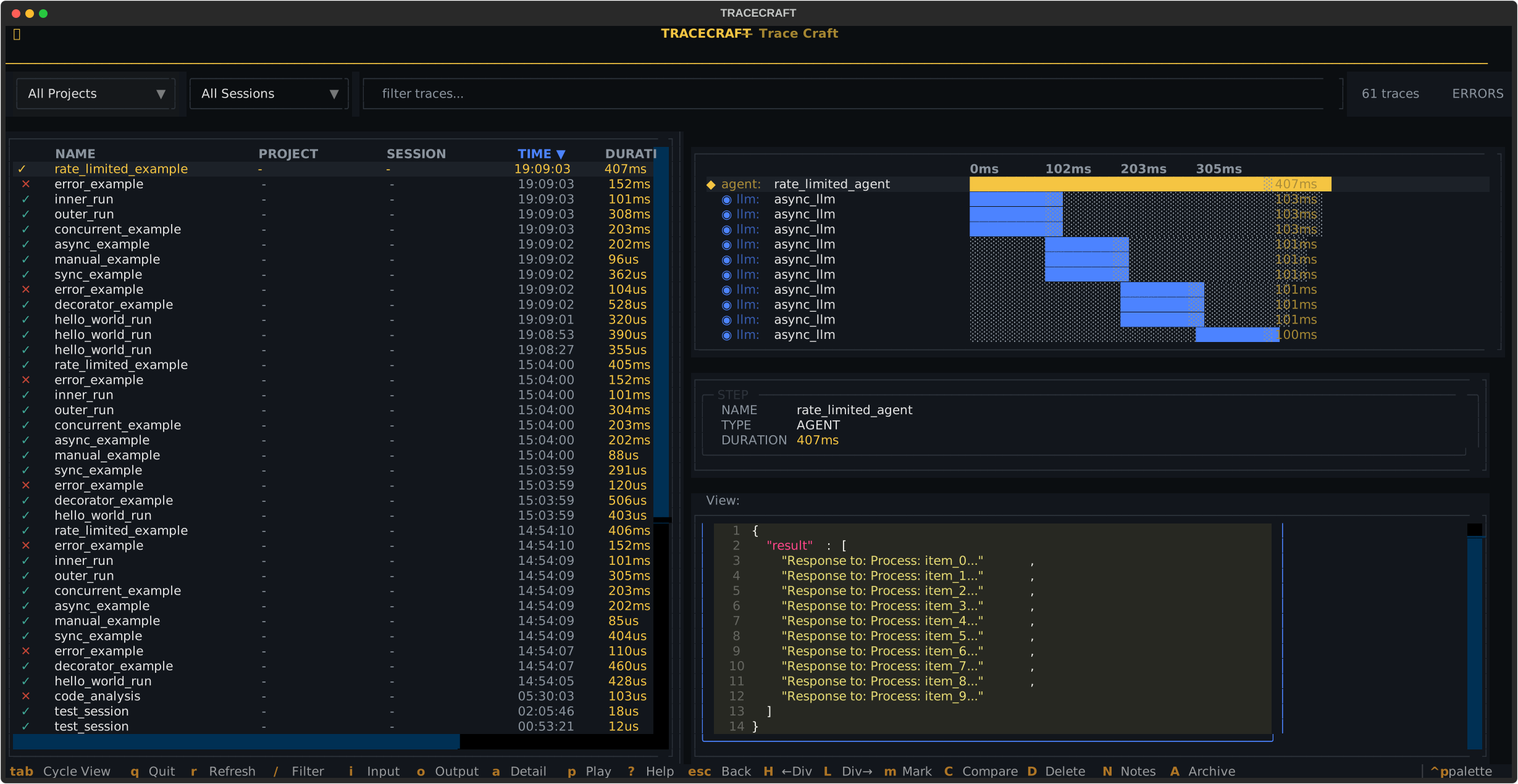
All your agent runs at a glance — name, duration, token usage, and status. Select any trace to drill down.
Select any trace to expand the full call hierarchy with timing bars. Navigate to any LLM step and press i for the prompt, o for the response, or a for all span attributes and metadata.
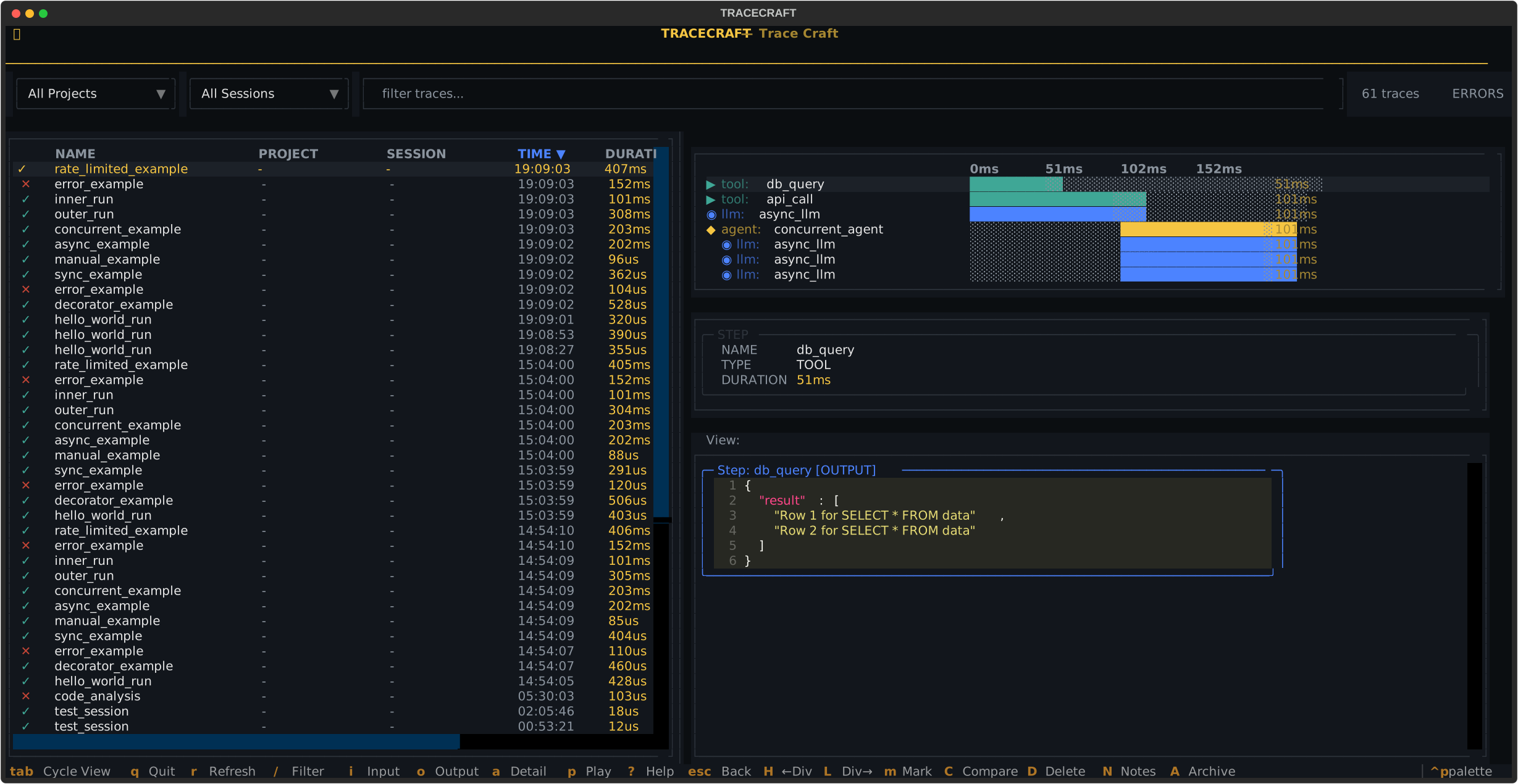
Hierarchical waterfall view — agents, tools, and LLM calls with precise timing. See exactly where your agent spends its time.
Path 2 — Config file + one init() call
When you want a persistent local setup — custom service name, JSONL export, PII redaction — drop a config file into your project and add one line to your app:
.tracecraft/config.yaml:
# .tracecraft/config.yaml
default:
  exporters:
    receiver: true         # stream to tracecraft serve --tui
  instrumentation:
    auto_instrument: true  # patches OpenAI, Anthropic, LangChain, LlamaIndex
Your app:
import tracecraft

tracecraft.init()  # reads .tracecraft/config.yaml automatically
Then start the TUI:
tracecraft serve --tuiOr, if you prefer to write traces to a file and open the TUI separately:
tracecraft tuiCall tracecraft.init() before importing any LLM SDK
TraceCraft patches SDKs at import time. Import your LLM libraries after calling init() so the patches apply correctly.
Path 3 — SDK decorators and custom tracing
For fine-grained control — custom span names, explicit inputs/outputs, structured step hierarchies — TraceCraft provides @trace_agent, @trace_tool, @trace_llm, and @trace_retrieval decorators, plus a step() context manager for inline instrumentation.
Why TraceCraft?
| Feature | TraceCraft | LangSmith | Langfuse | Phoenix |
|---|---|---|---|---|
| Terminal UI | Yes — built-in | No | No | No |
| Zero-Code Instrumentation | Yes | No | No | No |
| Vendor Lock-in | None | LangChain | Langfuse | Arize |
| Local Development | Full offline | Cloud required | Self-host | Self-host |
| OpenTelemetry Native | Built on OTel | Proprietary | Proprietary | Compatible |
| PII Redaction | SDK-level | Backend only | Backend only | Backend only |
| Cost | Free & Open Source | Paid tiers | Paid tiers | Paid tiers |
What the TUI Shows You
| View | What You See |
|---|---|
| Trace List | All agent runs — name, duration, tokens, status, timestamp |
| Waterfall | Full call hierarchy with timing bars (agent → tool → LLM) |
| Input View | Exact prompts, system messages, and context sent to the model |
| Output View | Model responses with token counts and cost estimates |
| Attributes | Model parameters, custom metadata, error details |
Keyboard shortcuts:
| Key | Action |
|---|---|
↑ / ↓ | Navigate traces |
Enter | Expand waterfall for selected trace |
i | View input/prompt |
o | View output/response |
a | View attributes |
/ | Filter traces |
m + C | Mark and compare two traces |
p | Open playground for prompt editing |
q | Quit |
How It Works
Path 1 — Zero code changes (OTLP env var):
- Set
OTEL_EXPORTER_OTLP_ENDPOINT=http://localhost:4318 tracecraft serve --tui— starts receiver on:4318and opens TUI- Run your existing app — traces appear live as they arrive
Path 2 — Config file + init() call:
- Add
.tracecraft/config.yamland calltracecraft.init()in your app - Run your agent — traces go to JSONL/SQLite
tracecraft serve --tuiortracecraft tuito explore
Installation
pip install "tracecraft[tui]"Includes the Terminal UI for local trace exploration.
Next Steps
Master the TUI — navigation, filtering, comparison, keyboard shortcuts
Get running in 5 minutes with instrumentation and the TUI
LangChain, LlamaIndex, PydanticAI, Claude SDK adapters
Complete API documentation for decorators, exporters, and more
Community & Support
- GitHub Issues: Report bugs and request features
- GitHub Discussions: Ask questions and share ideas
- Contributing: See our Contributing Guide
License
TraceCraft is licensed under the Apache-2.0 License. See LICENSE for details.